Loading
What’s new
New
Every page shares one bar: Home, Up next, Records and Messages, with Emergency beside them. On a phone the four sit at the foot of the screen. Records opens Things.
Everything in the house sits in one of four places.
HomeHome draws your house beside your day: the 3D house from House, with its floors and rooms. On a phone the house comes first. House now opens on Home.
Your house and your day share one screen.
Home
Better
On a computer the magnifier sits in the top bar, so one click opens Search. The keyboard shortcut still works.
Search is one click away, not only a shortcut.
SearchType warranty or under warranty and Search lists the things that have one, the expired ones last. Done jobs read newest first, and a thing with no place no longer says so.
The things still covered come up first.
SearchOn a thing, Something’s wrong offers It’s broken first, under any red stop lines. It opens one fix job, and the thing wears Broken while that job is open.
A broken thing gets its fix job in one tap.
ThingsOn a job, Share the job opens one sheet: who it is for, what they see, how long the link lasts, then Copy link.
You see what they will see before you share it.
ProjectsIn Emergency, Who to call shows three people, and the All row with its count opens the rest in People.
On a phone the first steps stay on the screen.
EmergencyWhen the camera can’t open, it says so in one line, and Choose a photo is the act, with Type it beside it. No kind is picked until you pick one.
With no camera, a photo from your files does the same job.
AddOn Money, a job out for bid reads its bids low to high. Two bids at one figure read it once, “2 bids, $4,000”, and bids with no price are counted apart, “2 bids, 1 priced, $1,240”.
The figure says only what the bids say.
MoneySaving your house reads “Free for one house. Your email signs you in, no password.” The rooms laid out for you read Roughed in, and Overture Maps is credited with the outline only.
Each word on the first screen is true.
Getting started
Better
On House, the whole house opens closed, walls up and roof on. Open a floor or a room, pull the floors apart, or cut a section, and the roof lifts off.
You see the house first, then go in.
HouseA house with no outline stands as a box sized from its square footage, with its storeys from the public record, on House and on Home. Draw your rooms opens on those estimated rooms, and Save keeps only the rooms you touched.
A new house never opens blank.
HouseIn Emergency, a shut-off row opens the thing it names. Ask is its own button beside it.
The valve is one tap away.
Today, EmergencyA payment typed with no date sits under “No date” on Money, Timeline and Score, not on the day you typed it.
Homaic never makes up a day.
MoneyIn every money field, 1,250 and 1 250 are $1,250. 12,50 and 12 50 are turned back, never read as $1,250.
The figure is the one you meant.
MoneyA paper with a vendor and an amount files as a receipt unless it reads as a quote.
Bills don’t land as quotes.
AddA paper with no house shows once, under All houses, instead of on every house. A new house’s Up next counts none of them.
A new house starts clean.
DocumentsA Done project’s money shows on its Timeline row and counts in the year and house totals.
A finished project’s money stays on Timeline.
TimelineOn the House, Show’s Rooms readings (Due, Age, Water, Power) tint each room’s floor, in 3D and on the plan, with a legend of bands and counts.
You see which rooms need you.
HouseWhen the season leads, Today shows the house’s drawing, the season’s dates, its whole list, and one act.
One screen says what this season asks.
Today
On homaic.io
Rivit joins the comparison, each cell quoted from its own pages, read November 9.
You can check every claim.
Compare
New
A house with nothing on its record opens House details with three steps: public record, year built, and type. When Homaic has its outline, the house’s drawing and an estimated footprint with its source sit above them.
You see your own house and what to add first.
House details
Better
On the five 911 cards, the Tell button says “once you’re outside”, as the Call beside it does.
Getting out comes before telling anyone.
Today, EmergencyFloor wet at the pump? Skip the step. Otherwise, with dry hands, check the plug and, if the outlet has a Reset button, press it once.
Water and power stay apart.
Today, EmergencyOn the water card, a water company you’ve named, with a line that answers now, gets its own Call.
You reach them from the card.
Today, EmergencyOn a computer, in Edit layout, saving a plan on a floor already drawn takes off the estimated rooms, doors and windows you left alone. A room with anything in it stays, by name, and Undo takes it back.
A plan doesn’t leave old guesses behind.
House, Edit layoutA page saved from a store reads as a product page, with its price as “listed $3,295”. It’s never counted in Money.
A listing isn’t a bill.
DocumentsWhen AI is paused or spent, waiting papers stay Waiting to be read instead of failing.
Nothing is lost while it waits.
DocumentsOn a shared house with 3D on, a device that can’t draw 3D, or a phone drawing it slowly, shows the drawing.
The link still works.
Timeline, Share
Privacy and security
For accounts opened before November 6: from December 6, Homaic also counts the main things you do. It never counts anything you typed, and the Product analytics switch turns it off. Those accounts stay out of counts across homes unless they say yes.
Each count carries a name and ID numbers, never anything you typed, and we promised 30 days’ notice before a change like this.
Privacy policy
New
Settings is one page of cards: You, Houses, People, Access, Notifications, Mail in, AI, Privacy and Your data.
What you can change is on one page, with a list to jump between cards.
SettingsThe Emergency card lists your house’s shut-offs, and where each one is when it’s on the record. The owner also sees who to call, and a phone or tablet can call 911.
The shut-offs and the numbers are on one card.
Today, EmergencyThe Handover sheet and its link open with the shut-offs, each with its name and where it is, or “not on the record”. Links you already made stay as they were.
Whoever takes over the house sees what to turn off first.
Timeline, Share the house historyThings with no room wait in a Not placed list on the House. Drop one on a room, or use Place in, and Undo takes it back.
You set where a thing lives by pointing at the room.
HouseOn a thing with a filed manual, Something’s wrong has “A code on the display”. Type the code and Homaic quotes the maker’s row with its page, or opens the page for a warning or gas.
You read what the thing’s own manual says about the code.
Things, Something’s wrongOn a computer, a Cut slider cuts every wall at the height you pick.
You look inside the house at the height you choose.
House, in 3DThe House’s year is one line up to Now, with dots for what is dated. A thing’s usual life shows as a dashed dot ahead, never as a date.
You see what has passed and what is coming in one line.
House, in 3DOn a computer, in Edit layout, bring a picture of a floor plan. With AI on, Homaic reads it and places its rooms with the sizes the plan prints. Keep saves the ones you want.
You keep the rooms a plan already shows, and you don’t draw them by hand.
House, Edit layout
Better
On a computer, in Edit layout, a door or window slides along its wall, and an estimated one can come off. When a room’s size changes, the change line shows the new size and the old, and Undo takes it back.
You can fix a plan where it is wrong.
House, Edit layoutOn a poor answer, the thumbs-down offers This is wrong or Something was invented, and Homaic reads your note.
Your note says what went wrong.
AskWhen you have told Homaic who your gas or water company is, the gas and water steps in Emergency and Ask name it.
The company to call is in the step when it is on your record.
Emergency, AskWhen you send Homaic a note, its replies arrive under Conversations in Ask, one conversation per note, with a reply box.
The reply to a note sits with your chats.
Ask, ConversationsArchive on a thing is one press with Undo on its receipt. Add a reason afterwards if you want. Delete stays for a thing added by mistake and keeps its confirm.
You can archive without a form, and Undo is on the receipt.
ThingsThings groups your big systems by trade above the list: name, room, installed, last service and next.
You see each trade’s systems together.
ThingsOn People, the Unassigned band lists each thing with nobody on it and no live warranty, worst first, each with its own Assign someone.
You see each uncovered thing, not just a count.
PeopleWhen you share a record from a house with a plan, “Show the house” lets the person with the link see the house, read-only. It sends floors, room names and your first name, never your things.
They see the house and none of your things.
Timeline, ShareA receipt you drop that reads clearly files to Money once, and Undo takes it back. To-dos from a paper that came by mail, Gmail or a pro’s link wait until you tap Add them.
Money fills from your receipts in one step.
MoneySettings, Text offers Standard or Larger. Larger raises body text and titles across the app, for this browser.
You can read Homaic at a size that suits you.
SettingsA deposit on a job under way counts as paid on Money, on the day you paid it.
A deposit shows as paid when you paid it.
MoneyAt rest, the 3D stage shows the Drawing, 3D and Plan buttons, Show, the house and the camera row, plus a floors pill when the house has more than one floor. Sun is Show’s last row, and a house with rooms drawn on more than one floor has Apart as a row in Show.
Nothing else stands on the house until you ask for it.
House, in 3DIn 3D, the buildings next door are drawn low, or left out when they touch your house, so their roofs don’t hide it from the usual view.
Your house stays in view.
House, in 3DWith nothing on record, Things shows a finder over a sample label and a way to import. Add a thing opens the camera, or a photo picker where there is none.
Your first thing starts from its label.
ThingsWith any of them missing, Money shows one list: what you paid for the house, your mortgage and your insurance. Type what you paid. A statement or declarations page fills the other two, or you can type them. The list stays until all three are done.
Money stands on those three facts, so they come first.
MoneyStarting a house shows the house clear, with no step bar, and Not this house follows the city.
You get from your address to your house with less in the way.
Start a houseThe carbon monoxide card now opens with the alarm: “A loud alarm, four beeps and a pause, is CO. One short chirp every 30 to 60 seconds is a worn battery or an old alarm, not CO. Replace it.”
A real alarm should never be read as a chirp.
Today, EmergencyWhen someone with edit access leaves your house or loses that access, a shut-off or who-to-call kit link gets a new link. That kit’s page says the old one stopped when they left, by first name if it has one, until someone opens the new link.
You know why an old link stopped and that the new one needs sending.
Kits & Trips
On homaic.io
Compare sets Homaic beside 29 other home apps, with quotes and their sources.
You can weigh more of the apps you may be choosing between.
CompareHome guides adds “What to do after the home inspection report” and “Before you sign a contractor’s quote”, with a printable card for the quote.
Two big decisions get a plain checklist.
Home guidesEvery page on homaic.io has the same bar: How it works, Home guides, Compare, Privacy, Log in and Look up your home.
You find your way from any page.
Homepage
New
Documents file themselves. When Homaic is sure where a document belongs, it files it, and you can undo it.
A document you add lands on its record in one step, and you can undo it.
Documents, Inbox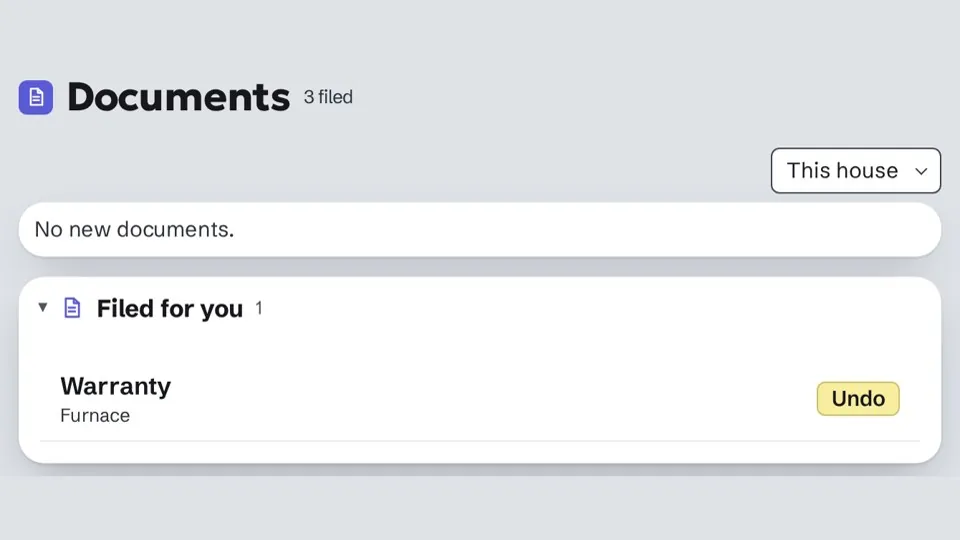
On a computer, a record lists the messages that mention it.
Every message about a thing is on the thing.
Things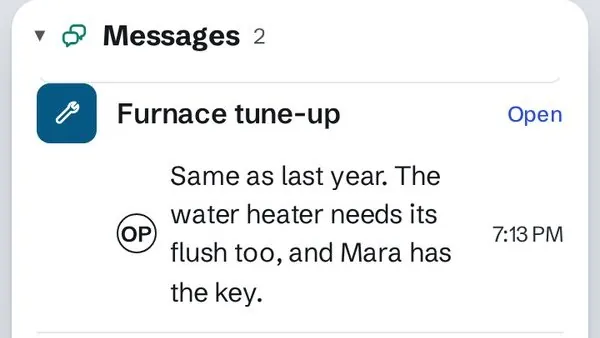
Guides on your own house, on the button that does each step. Turn them off in Settings.
You learn each step where you do it, and can turn the guides off.
HouseOn a computer or tablet, pick a room or a thing in 3D and its details open beside the house.
You read a room or a thing without leaving the house.
House, in 3D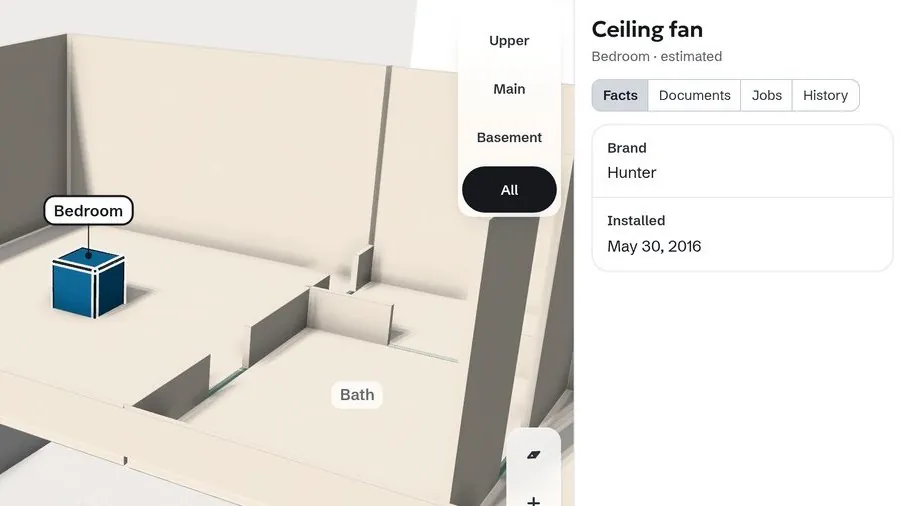
On a new house’s estimated plan, Move the rooms opens the layout editor. Your first save keeps every room, door and window, marked as estimated.
The plan you keep stays yours and still says where it came from.
House, Move the rooms
Better
Sharing with a buyer: their page updates beside you as you choose what to include, and one box adds your name and the house drawing.
You see the buyer’s page before you send it.
Timeline, ShareThe Sample house has its furniture in 3D.
The Sample looks like a lived-in house, not empty rooms.
Sample houseA house shared with you has no owner menu in Settings.
You only see what you can change.
Settings, HousesWhen you pick who did something, typing your own name keeps You in the list.
You can put yourself on a job by typing your name.
TimelinePeople and Access say exactly what changed.
Each change tells you what happened and nothing more.
Settings, People
Privacy and security
No one can be added to a house without accepting the invitation themselves.
A seat in your house always belongs to the person who said yes.
Settings, PeopleSevere-weather alerts use the map point already on your house, and never send your address to check the weather.
Your address stays in Homaic when a storm is near.
Privacy policySettings, Connected tools says that what a connected tool reads goes to the company that makes it. The AI switch names Anthropic and OpenAI.
You know which company sees what before you turn something on.
Settings, Connected toolsThe privacy policy says what Gemini can show you if you connect it, and that Google may use it to improve its AI models.
You know what connecting Gemini means before you do it.
Privacy policy
On homaic.io
The homepage draws a water heater apart, five parts with their facts and sources, and sets repair, replace or a heat pump side by side.
You see one system’s facts and choices on one page.
HomepageNew words, in homeowners’ own: “Just bought a house?” and “Is this quote fair?”
Each page starts from what you are trying to do.
Just bought a house?The “Something broke or got recalled?” page shows the nameplate photo and the record it became, side by side.
You see what one photo turns into.
Something broke or got recalled?Compare shows which of five more home apps are free, and whether each lets you bring your own AI.
You can weigh price and AI before you choose.
CompareYou can use your own Anthropic key for chat.
You can pay Anthropic directly for chat.
Your data and privacy